How to Clone Viral Short Videos with AI: Step-by-Step Viral Clone Tutorial
You see a viral video on TikTok. It has 2 million views. The pacing is tight, the hook lands in the first second, and every beat feels intentional.
You want to make something like it. Not a frame-by-frame copy — but a video with the same energy, the same rhythm, the same structural pull that makes people stop scrolling.
The traditional approach? Watch the video 50 times, try to reverse-engineer the timing by eye, hire an editor, and hope the result captures whatever made the original work.
That process is slow, expensive, and unreliable.
Reelsy Viral Clone solves this differently. It extracts the pacing DNA of any short viral video and generates an entirely new video with the same rhythm — but with your subject, your scene, your style.
This tutorial walks through the entire workflow, from pasting a URL to downloading your generated video.
What Is Viral Clone and Why It Matters
Viral Clone is not a video downloader. It is not a remix tool. It is a pacing intelligence engine.
Here is what it actually does:
- Analyzes a reference video to extract its motion pattern, beat shape, hook structure, and visual rhythm
- Evaluates whether the video is suitable for cloning (not every video works)
- Plans an adaptation strategy — what to keep, what to change
- Generates a new AI video that inherits the pacing DNA but looks completely different
Who Is This For?
- Content creators who want to replicate viral formats without manual editing
- Social media managers producing content at scale across multiple accounts
- Brand marketers who need to stay on trend without a production team
- Faceless channel operators running theme-based accounts on TikTok or YouTube Shorts
What Makes It Different From Manual Editing?
| Approach | Time | Cost | Skill Required | Consistency |
|---|---|---|---|---|
| Manual recreation | 2–4 hours | $200–500 per video | Advanced editing | Low — depends on editor |
| Template-based tools | 30–60 min | $20–50 per video | Basic editing | Medium — rigid templates |
| Viral Clone | 3–8 minutes | Under $5 | None | High — AI-driven pacing |
Step 1: Paste Your Reference Video
Go to the Viral Clone page in Reelsy. You will see a clean input interface.
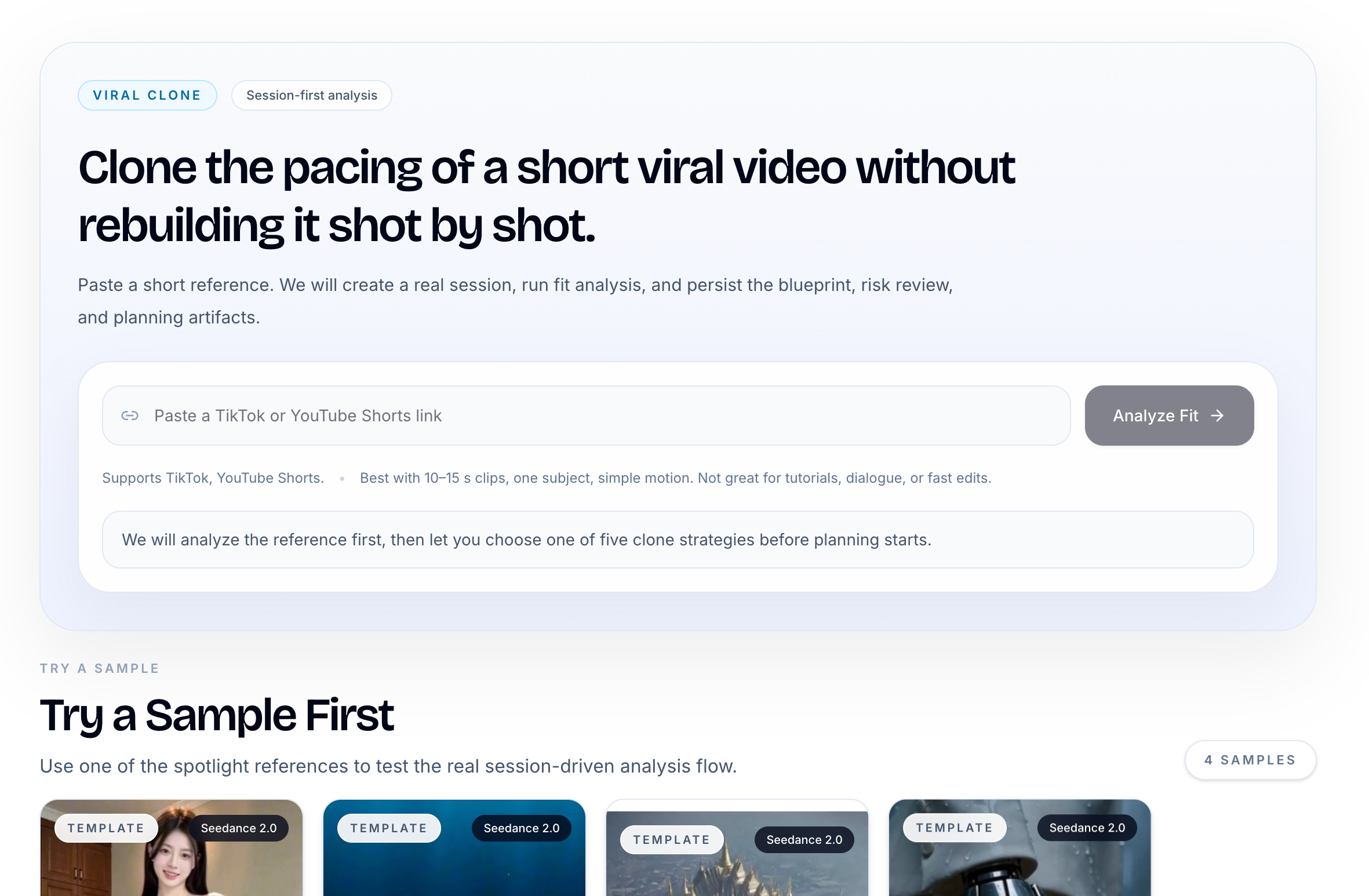
Paste a TikTok or YouTube Shorts URL into the input field. The system accepts both platforms.
Tips for choosing a good reference:
- Pick videos between 10 and 15 seconds. This is the sweet spot for cloning
- Choose videos with one clear subject. Multi-character scenes are harder to clone
- Prefer visual-driven content over dialogue-heavy videos
- Look for videos with clear motion patterns — transformations, reveals, style changes, stunts
What to avoid:
- Tutorials or how-to videos with step-by-step instructions
- Fast-cut montages with 10+ scene changes
- Lip-sync or dialogue-dependent content
- Videos longer than 20 seconds
Click Analyze Fit to start the session.
Step 2: Watch the Fit Analysis Run
Once you submit a URL, Viral Clone creates a persistent session and begins deep analysis.
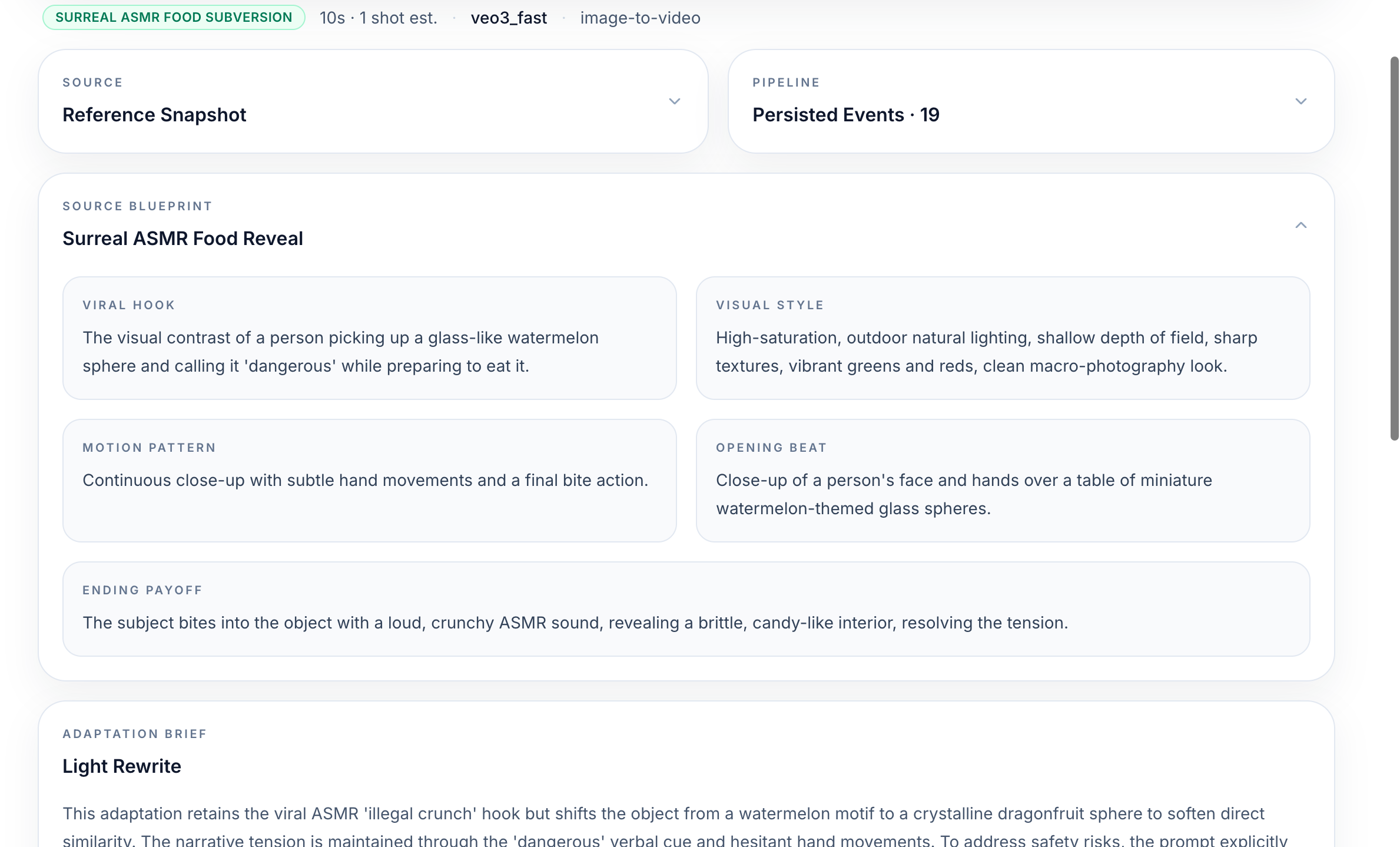
This is not a fake progress bar. The system is actually performing multiple analysis passes:
- Source ingestion — downloads and validates the video format, duration, and aspect ratio
- Video decomposition — extracts keyframes, counts shots, identifies subjects, measures scene intensity
- Motion continuity analysis — maps how movement flows through the video
- Dialogue dependency check — determines if the video relies on spoken words
The analysis takes 30–90 seconds depending on the video complexity.
Step 3: Review the Fit Result
After analysis, Viral Clone gives you a clear eligibility verdict.
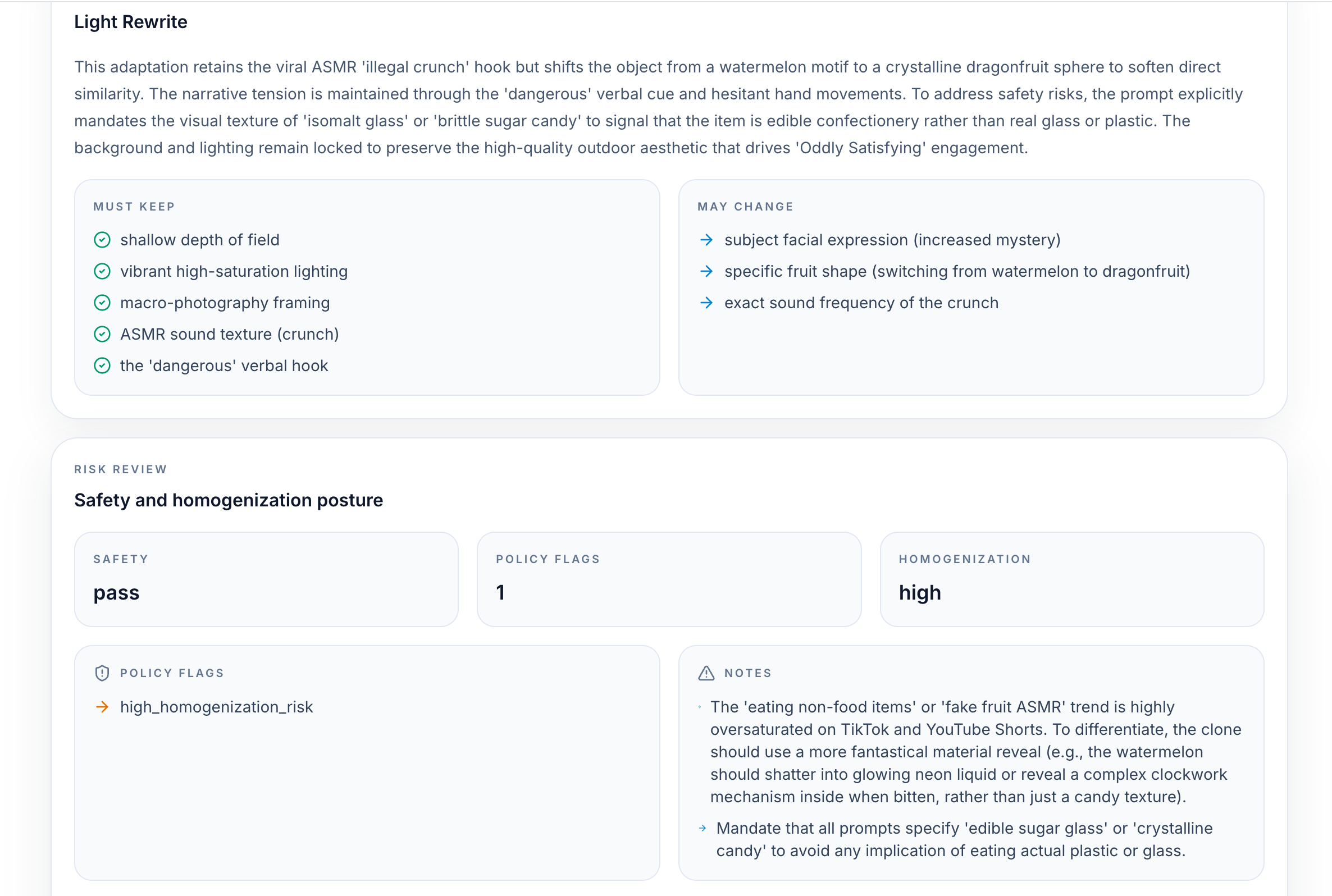
The system assigns one of three statuses:
- Eligible (green) — The video is well-suited for cloning. Proceed to planning
- Review (yellow) — The video can be cloned but needs tighter constraints. You may need to adjust adaptation settings
- Reject (red) — The video is not suitable for cloning. This usually means it has too many subjects, is too long, relies on dialogue, or has complex multi-scene editing
If your video is eligible, the system also generates a Source Blueprint — a structured extraction of the video's DNA:
- Theme and hook — what makes people stop scrolling
- Motion pattern — how movement progresses through the video
- Opening and closing payoff — how the video starts and ends
- Style anchors — visual characteristics that define the look
Additionally, a Risk Assessment runs automatically, checking for safety issues, copyright concerns, platform-specific risks, and homogenization warnings.
Step 4: Choose Your Adaptation Intent
This is where you decide what to keep and what to change. Viral Clone offers five adaptation modes:
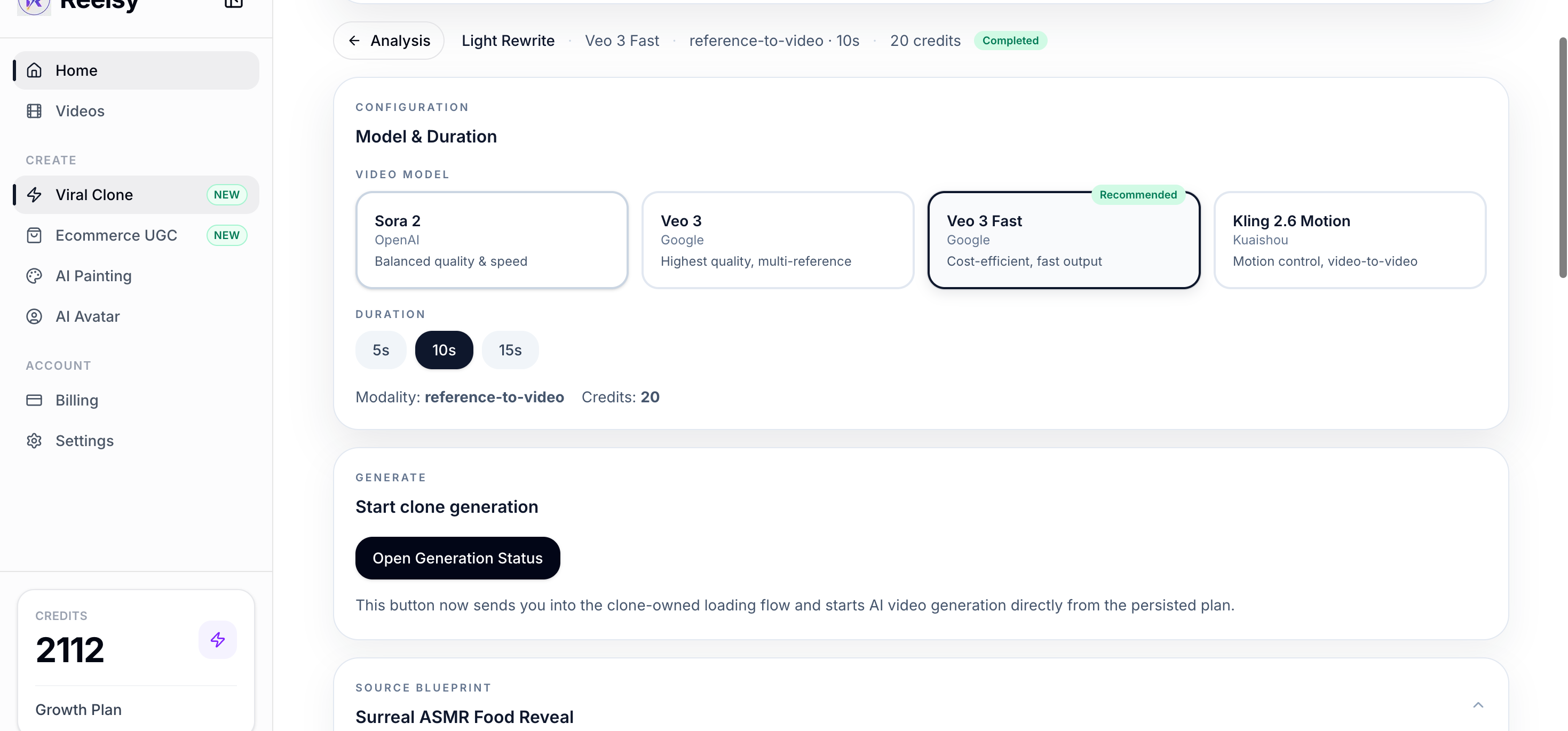
- Replicate Form — Keep the hook, pacing, and structure. Change as little as possible. Best for testing the format with minimal variation
- Replace Subject — Swap the identity (person, product, character) but keep the motion and scene. Great for brand adaptations
- Replace Scene — Keep the subject role and motion but place them in a new setting. Good for location-based content
- Replace Both — Keep only the pacing logic and beat shape. Everything else changes. Maximum creative freedom
- Light Rewrite — Keep the hook and soften obvious similarities. Best for creating content that is inspired by, not identical to, the reference
The system also shows an Asset Pack with suggested reference images for subject, scene, and style consistency. You can upload your own reference images or let the AI choose.
Step 5: Generate Your Video
Once planning is complete, Viral Clone compiles a generation prompt from the blueprint, adaptation intent, and asset pack. It automatically selects the best AI model for the job.
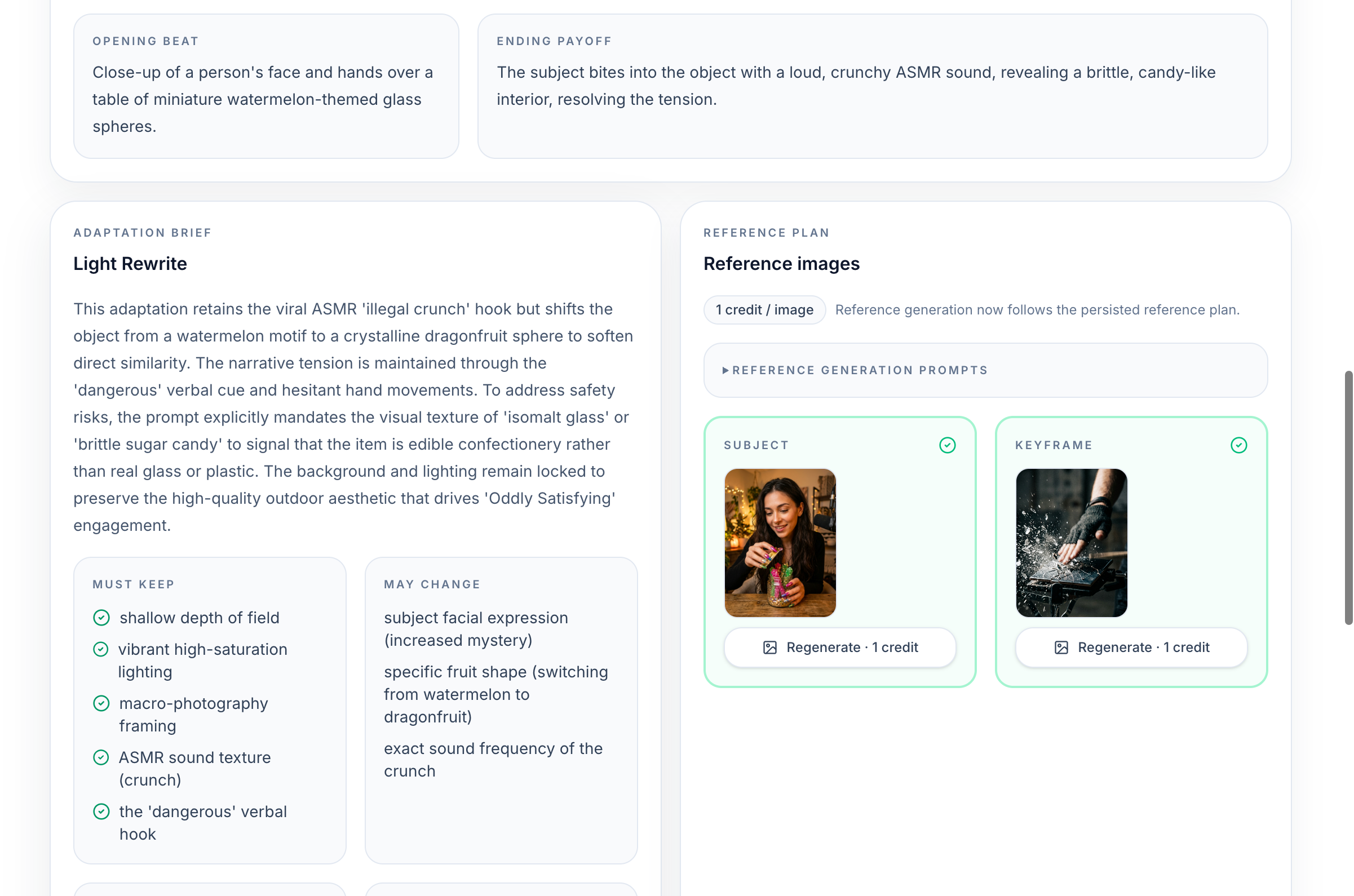
The model routing is automatic:
- Sora for 10–15 second clips with complex motion
- Veo 3 for high-quality output with style fidelity
You do not need to understand models or prompting. The system handles everything based on the analysis results.
Generation typically takes 2–5 minutes.
Step 6: Review and Download
Once generation is complete, you get your finished video.
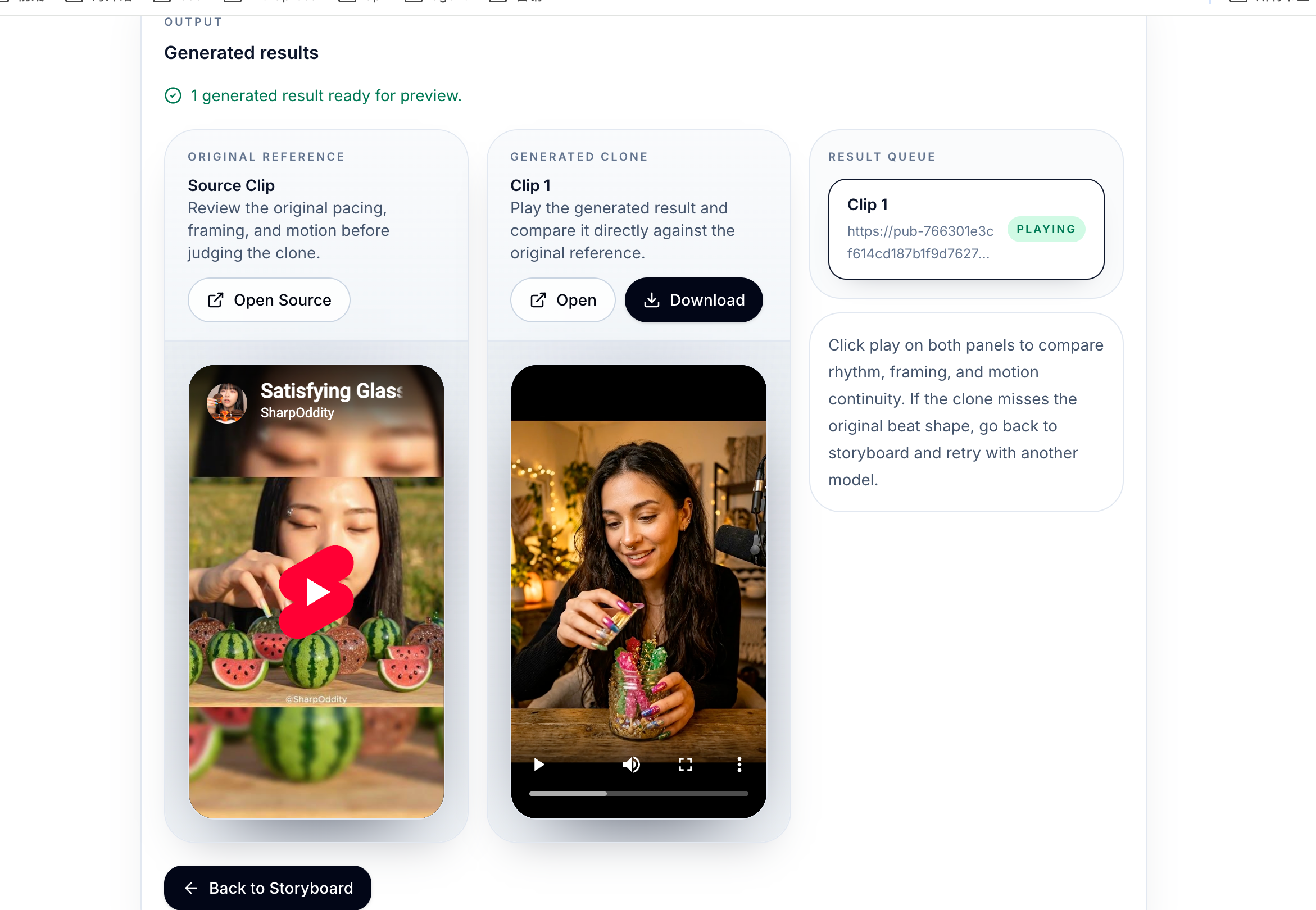
The output video inherits the pacing DNA of the original — the same hook timing, the same beat shape, the same motion rhythm — but with completely different content.
From here you can:
- Download the video for immediate posting
- Regenerate with different settings if needed
- Adjust the adaptation intent and try a different approach
Best Practices for Better Results
After producing hundreds of cloned videos, here are the patterns that consistently deliver the best output:
Pick the Right Source Material
The quality of your output depends heavily on the quality of your source. The best reference videos share these traits:
- Single continuous action — one subject doing one thing
- Visual spectacle — transformation, reveal, stunt, or style change
- Clean motion arc — movement that flows naturally without jumpcuts
- Strong hook — something happens in the first 1–2 seconds
Use the Right Adaptation Mode
- For brand content: use Replace Subject mode. Keep the viral pacing, swap in your product
- For content series: use Replace Scene mode. Same character, different settings
- For trend riding: use Replicate Form mode. Stay as close to the viral format as possible
- For original content: use Replace Both mode. Extract only the rhythm
Iterate Quickly
Viral Clone sessions are persistent. You can re-run the same blueprint with different adaptation settings without re-analyzing the source. This makes iteration fast — try Replace Subject, see the result, switch to Replace Both, compare.
Understand the Limitations
Viral Clone works best with:
- 10–15 second clips
- One subject with simple motion
- Visual-driven content (not dialogue)
- Single scene or weak transitions
It does not work well with:
- Multi-character scenes
- Tutorial or instructional content
- Fast-cut montages
- Narrative-dependent videos
Knowing these boundaries saves generation credits and time.
Real-World Use Cases
Faceless Content Channels
Operators running faceless TikTok or YouTube Shorts accounts use Viral Clone to maintain a consistent posting schedule. Find 3–5 viral videos per week, clone their pacing with your niche content, and maintain volume without an editing team.
E-commerce Product Launches
When a competitor's product reveal goes viral, use Viral Clone to extract the pacing pattern and apply it to your own product. Same hook energy, same reveal timing — different product.
Social Media Agencies
Agencies managing multiple client accounts use Viral Clone to quickly adapt trending formats across different brands. One viral reference can produce 5–10 variations for different clients in under an hour.
Creator Growth Strategy
New creators use Viral Clone to study and replicate what works. Instead of guessing why a video went viral, the system extracts exactly what made the pacing effective — and lets you apply that structure to your own content.
Frequently Asked Questions
Is this the same as stealing someone's video?
No. Viral Clone does not copy any frames, audio, or visual elements from the source. It extracts the pacing structure — timing, rhythm, beat shape — and generates an entirely new video. The output contains zero content from the original.
How much does it cost?
Each generation typically costs under $5 in AI credits. The analysis phase is free.
What platforms are supported as source?
Currently TikTok and YouTube Shorts. Both short-form vertical video platforms are fully supported.
Can I use my own character or product as the subject?
Yes. In the planning phase, you can upload reference images for subject, scene, and style. This is especially useful for brand content and product videos.
What if my video is marked as "Reject"?
The system rejects videos that are structurally unsuitable for cloning — usually because they have too many subjects, rely on dialogue, or use complex editing techniques. Try a different reference video that fits the guidelines: 10–15 seconds, one subject, simple motion.
How long does the entire process take?
From pasting a URL to downloading the final video: 3–8 minutes total. Analysis takes 30–90 seconds, planning is instant, and generation takes 2–5 minutes.
Start Cloning Viral Pacing Today
The gap between creators who grow and creators who stagnate is often not creativity — it is execution speed. Viral Clone gives you the ability to identify what makes a video work, extract that structure, and apply it to your own content in minutes instead of hours.
Stop guessing why videos go viral. Start using the pacing intelligence that drives them.