Small ecommerce teams
Create product visuals and short videos for your store and social channels, starting with the assets you already have.
FOR SMALL ECOMMERCE TEAMS & CREATIVE STUDIOS
Create product images. Generate the shots you need. Edit the footage you have. Bring your ecommerce creative workflow together with Codex + Reelsy.
Product images · Video generation · Editing · Canvas
UGC INSPIRATION
Selected public references from our UGC template library. Explore the original source and use each example as creative inspiration.
A creator-style coffee reference from the UGC library.
View source ↗A short product reference from the UGC library.
View source ↗A food advertising reference from the UGC library.
View source ↗Existing coffee clips. One clear brief. A visible timeline.
Stock-footage demonstration · English narration & captionsHere’s how to create an ecommerce video with Codex and Reelsy, using footage you already have. Start with your product clips and describe the edit in plain English. Codex uses Reelsy’s editing tools to arrange the clips, add on-screen text, and adjust the framing. Review the timeline and preview in Reelsy, then tell Codex what you’d like to change. This coffee example shows the workflow with stock footage. It isn’t a client campaign or a performance claim. Your footage. Your instructions. Codex and Reelsy, working together.
Screen recording edited for length with FFmpeg; voiceover generated with Reelsy. The presenter inset is not lip-synced. This is a workflow demonstration, not a client campaign or a claim about production speed.
THE WORKFLOW
Start with a product, a brief, and the assets you already have. Use Codex to direct the work and Reelsy to create and review it.
Bring product photos, existing footage, and verified product details. Describe the image or video you need.
Generate product visuals or video assets, edit existing footage, and request voiceover or on-screen text when needed.
Review generated assets on your canvas. Open the video editor for timeline work, check the result, and request specific changes before delivery.
01 / PRODUCT IMAGES
Create product visuals and lifestyle concepts from your brief and reference images. Review the product’s appearance and details before using the result.
Explore image creation →02 / VIDEO GENERATION
Generate video assets from text or images. Choose from supported models to suit the shot, input format, and creative direction.
MORE CREATIVE DIRECTIONS
From presenter-led content to cinematic scenes and software explainers. Find a creative direction for your next brief.
A studio-style presenter example.
A stylized character and cinematic setting.
A landscape software walkthrough.
03 / CANVAS & EDITOR
Review generated images and videos on your Reelsy canvas. Move into the video editor when you need to arrange clips, adjust framing, or refine on-screen text.
See how Codex connects to Reelsy →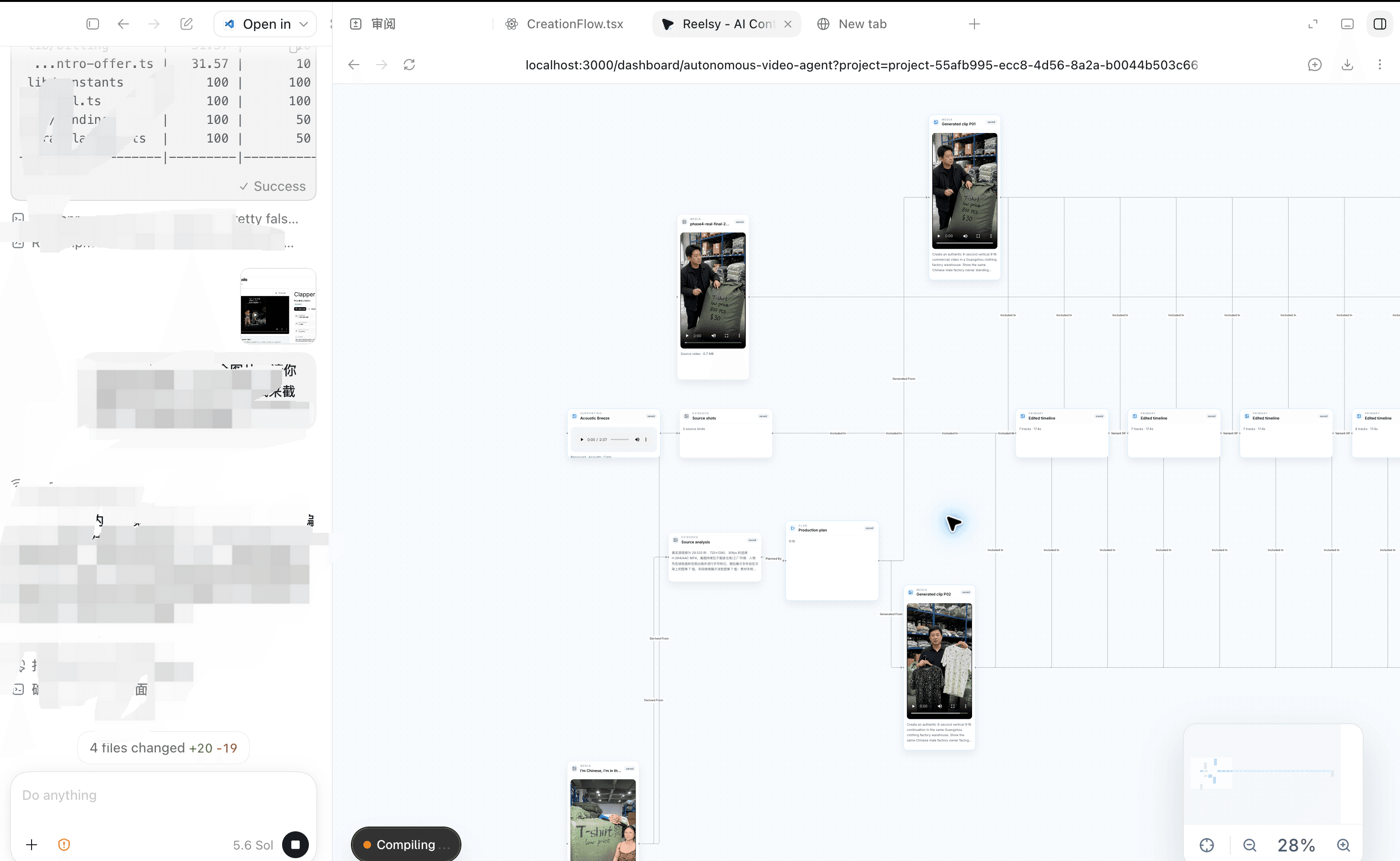
MORE WAYS TO CREATE
Ecommerce is one starting point. Bring the same creative tools to your next tutorial, talking-head edit, or social video.
Give a longer recording a focused edit. Specify the sections, framing, and on-screen text you need.
↗02Arrange footage around your message and refine the sequence, text, and presentation.
↗03Explore avatar and presenter tools for narrated explainers and product content.
↗04Add a voice to your brief and explore music-led video creation.
↗BUILT AROUND THE WORK YOU ALREADY DO
Create product visuals and short videos for your store and social channels, starting with the assets you already have.
Work from a client’s brief across images and video, then review assets and make focused revisions.
REELSY PLANS
Choose the plan that fits your workflow. Codex access is separate. Paid generation shows its credit cost before confirmation.
Compare plan details →BEFORE YOUR FIRST EDIT
Yes. Reelsy supports image creation and video generation alongside video editing. Use your product brief and reference assets, then review generated outputs on the canvas. Check product details and claims before publishing.
No. Ecommerce is one workflow. Reelsy also provides general image and video creation, footage remixing, and presenter assets. The tools you use depend on the task and available inputs.
Small ecommerce teams, freelance creators, and creative studios that need product images, generated video assets, or edits made from existing footage.
You describe the edit in Codex. The Reelsy plugin gives Codex access to Reelsy’s tools, while you review the video and timeline in the Reelsy editor. Connect your Reelsy account before starting.
Start with product clips, demonstrations, and creator footage you own or have permission to use. Tell Codex which clips to use, your intended format, and the message you want the video to communicate.
You can request on-screen text and generate voiceover through Reelsy. Paid generation shows the expected credit cost before you confirm. Review the wording, timing, and pronunciation before delivery.
No. It is a stock-footage coffee example. The screen recording is shortened and rearranged for explanation, with narration and a presenter inset added using FFmpeg. It does not demonstrate client results or a 45-second production time.
Follow the plugin setup guide, connect your Reelsy account, and start with a small set of clips. Installation and authorization do not spend Reelsy credits. Reelsy plans and generation credits are separate from your Codex access.
YOUR FOOTAGE. YOUR INSTRUCTIONS.