Why Short-Video Teams Move Slowly Without Content Templates and SOPs
Most teams say they have a production problem. In reality, they usually have a repeatability problem.
The editor is waiting for a cleaner brief. The strategist is rewriting the same opening again. The person managing the account is asking for "one more version" because nobody agreed on a format before production started. The result is predictable: every video feels like a custom project, even when the business is publishing the same kind of content every week.
From working on Reelsy, we keep seeing the same pattern across creator teams, ecommerce operators, and ad studios: teams blame editing speed, but the real drag comes from starting from a blank page every time.
That is why the right conversation is not "How do we edit faster?" It is "How do we stop recreating the entire workflow for every asset?"
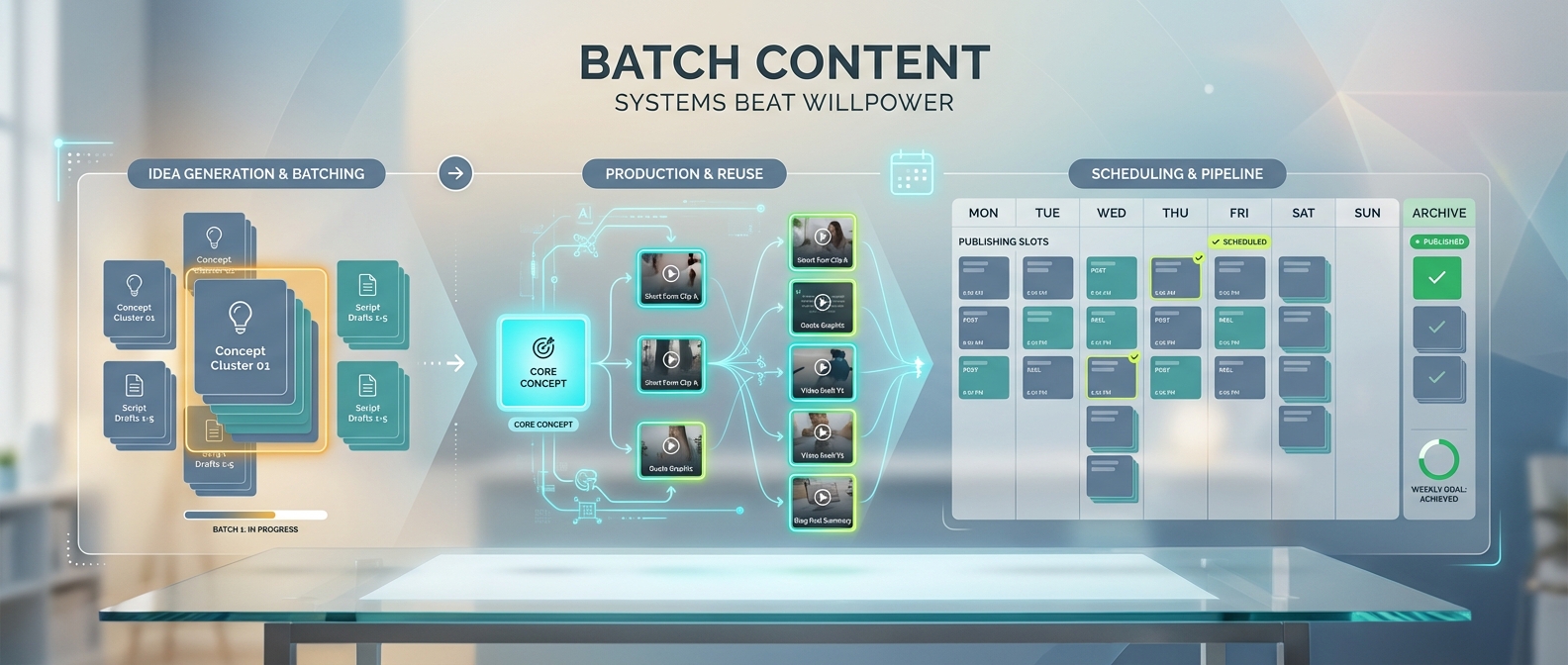
If your team is also struggling with publishing consistency, pair this with Batch Content Workflows: Why Daily Posting Is a Systems Problem, Not a Discipline Problem. If your bottleneck is audience retention rather than throughput, read Why Most Short Videos Fail in the First 3 Seconds.
The Real Bottleneck Is Reset Cost
Reset cost is everything your team has to re-decide before a video can even move:
- What is the angle?
- Who is the audience?
- What should happen in the first three seconds?
- What visual style are we using?
- Which format fits this channel?
- What counts as "good enough" for approval?
If those questions stay open until production starts, you do not have a creative process. You have a recurring coordination tax.
That tax shows up as:
- Slow content turnaround
- Inconsistent hooks and positioning
- Uneven video quality across accounts
- Endless internal review loops
- Editors doing strategy work they should never own
Templates and SOPs solve this by forcing good decisions earlier.
A Template Is Not a Shortcut. It Is a Decision Container
Teams often hear "template" and think of something generic, cheap, or creatively limiting. That is the wrong model.
A content template is simply a reusable structure for decisions that should not be reinvented each time.
For short-form video, a useful template usually includes:
- Audience definition
- Content goal
- Hook style
- Story or argument structure
- Visual rules
- Call-to-action pattern
- Platform format requirements
If you want a simpler tactical checklist for short-form production quality, 5 Best Practices for Creating AI Videos is a useful companion read.
For example, a template for a founder-led talking video might look like this:
- Start with a tension-based statement
- Name the common mistake
- Give one operating principle
- Show a concrete example
- End with one action point
That is not restrictive. It is clarifying.
The team still has room for fresh ideas, but it is creating inside a system instead of improvising basic structure every time.
An SOP Makes the Template Usable
Templates define the structure. SOPs define the flow.
If your team has a decent format but still misses deadlines, the missing piece is usually not creativity. It is handoff discipline.
A short-video SOP does not need to be complicated. A simple version can look like this:
| Stage | Owner | Output |
|---|---|---|
| Idea intake | Strategist or account lead | One approved angle |
| Script brief | Creative lead | Hook, body, CTA, style note |
| Generation or production | Editor or AI workflow owner | First draft |
| Review | Reviewer or team lead | Specific revision notes |
| Publish | Channel owner | Scheduled asset + tracking |
Without that, videos bounce around between people with vague feedback like "make it stronger" or "needs more energy."
That is not a production note. That is a sign your upstream process is broken.
What a Minimum Viable Short-Video Template Should Contain
If you want one template that works across most short-form workflows, start here:
1. Goal
What is this asset supposed to do?
- Drive awareness
- Explain a product
- Sell a product
- Test a hook
- Support daily posting
2. Audience
Do not say "everyone."
Say:
- First-time ecommerce buyer
- Startup founder
- TikTok beauty shopper
- SaaS marketer
3. Hook Pattern
Define the opening pattern before anyone writes the script:
- Contrarian opinion
- Pain statement
- Before/after tension
- Mistake framing
- Time-saving promise
4. Body Structure
Choose one:
- 3-point list
- Problem -> cause -> fix
- Story -> lesson -> CTA
- Demo -> proof -> CTA
5. Visual Rules
Lock the basics:
- Aspect ratio
- Caption style
- On-screen presenter or not
- Product-first or face-first framing
- Character or spokesperson consistency rules
6. Approval Criteria
Before production starts, define what the reviewer is judging:
- Is the hook clear in the first three seconds?
- Is the message understandable without audio?
- Does the asset match brand tone?
- Is the CTA visible and specific?
Where Reelsy Fits Into This System
Reelsy should not be treated as "one more tool that outputs video." It is most useful when it becomes the production engine inside a repeatable operating system.
Here is the practical mapping:
For story-first teams
Use Story Studio when the workflow starts from a concept, episode idea, or recurring format. Instead of rewriting the whole creative path every time, lock a brief structure such as:
- Episode premise
- Character role
- Emotional turn
- Target aspect ratio
- Ending beat
That turns story generation into a repeatable input pattern instead of a blank-canvas task.
If recurring characters or visual continuity matter in that workflow, also read The Complete Guide to Character Consistency in AI Videos.
For commerce-first teams
Use Ecommerce UGC when the workflow starts from a product image and a selling angle. The useful repeatable unit here is not just the final video. It is the brief skeleton:
- Product category
- Buyer pain point
- Main benefit
- Opening hook style
- Target video length
Once that is stable, the AI script optimization step becomes much more valuable because it is refining an operating pattern, not improvising from nothing.
If you want the broader production context behind this, Text to Video AI: Complete Tutorial for Creating Professional Videos in 2026 shows how structured inputs produce faster video drafts.
For presenter-led workflows
Use AI Avatar when you need a reusable on-screen presence across multiple assets. This matters because presenter inconsistency is often another hidden reset cost. If every new asset requires a new shoot, a new speaker, or a new visual identity, scale breaks fast.
For ad variations
Use UGC Ad when the job is to produce multiple creative angles around the same product or offer. In that workflow, the template matters more than the editing polish:
- Hook family
- Core product claim
- Proof format
- CTA style
A Simple Weekly SOP That Actually Works
If your team publishes frequently, this is a realistic weekly operating model:
Monday: Decide the angles
Approve 3 to 5 content angles only. No production yet.
Tuesday: Fill the templates
Turn each angle into a structured brief:
- Hook
- Body structure
- Visual style
- CTA
Wednesday: Generate first drafts
Use Reelsy workflows based on content type:
Story Studiofor narrative contentEcommerce UGCfor product-led assetsAI Avatarfor reusable presenter formats
Thursday: Review against fixed criteria
Do not review based on taste alone. Review against the checklist you already defined.
Friday: Publish and record learnings
Track what worked and update the template, not just the one video.
That last point matters. Good teams do not just improve outputs. They improve the system that creates outputs.
What to Measure
If you want to know whether templates and SOPs are working, do not look only at views.
Track:
- Time from brief to first draft
- Number of revision rounds
- Output per week
- Percentage of videos published on schedule
- Reuse rate of successful formats
Those metrics tell you whether the operation is getting more repeatable.
The Bottom Line
Most short-video teams do not need more hustle. They need fewer decisions happening too late.
Templates reduce unnecessary creative variance. SOPs reduce handoff chaos. Reelsy becomes more useful when it is connected to those two layers instead of being used as a one-off production shortcut.
If your team is still rebuilding the same workflow for every new asset, the next hire probably will not fix it. A better operating system might.
Next Steps
If this article matches what your team is dealing with, use this reading path:
- Read Why Most Short Videos Fail in the First 3 Seconds if your output is fast but weak.
- Read Batch Content Workflows: Why Daily Posting Is a Systems Problem, Not a Discipline Problem if your team keeps missing publishing cadence.
- Read The Complete Guide to Character Consistency in AI Videos if repeatable characters or visual continuity are part of your format.
- Read Text to Video AI: Complete Tutorial for Creating Professional Videos in 2026 if you want to turn a structured brief into a production-ready draft.
If you already know your problem is operational, the next move is not another brainstorming session. It is testing whether a structured workflow can actually shorten the path from brief to first draft.
Start with Reelsy to test story-led, product-led, or presenter-led workflows inside one repeatable system.