Create Multiple Video Ad Variations at Once
Turn one verified product source into up to three labeled ad directions, then review each editor draft on its own.
Start with one product URL or up to five product images in Content Studio. Choose one, two, or three variants in a single generation task, then compare distinct hooks and angles before you prepare each editor draft for export.
Public overview first
You can evaluate the workflow here. Live sessions, saved drafts, and generation start only after login.
Review product hooks and visual directions before you generate
These catalog examples are creative references, not customer campaign results, guaranteed outputs from this workflow, or evidence that a specific variant performed better.

Iced Protein Coffee TikTok Ad
Cinematic AI Video Prompt — Strict Sequential Panel Execution (1–9) Create a hyper-realistic cinematic UGC-style TikTok ad, vertical 9:16, ultra-realistic iPhone 15 Pro handheld f…
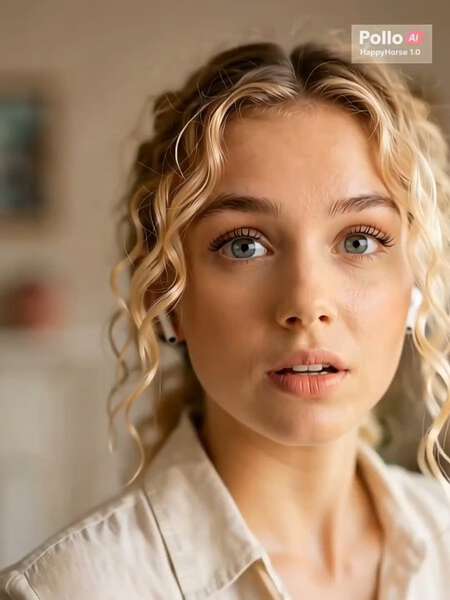
AirPods Pro UGC Commercial
A short cinematic yet realistic vertical UGC-style video of a young Western woman with naturally curly blonde hair in a cozy indoor setting. Soft warm lighting illuminates her fac…
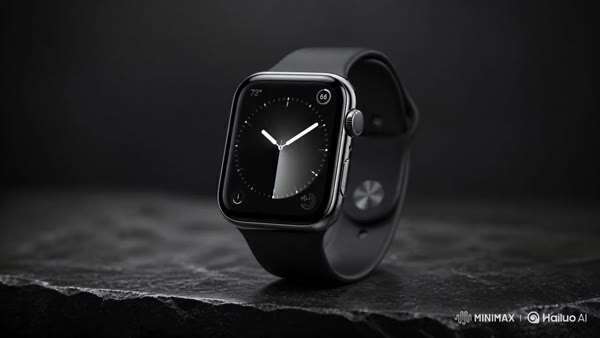
Smartwatch Product Demo
A sleek, premium smartwatch with a polished metal casing and illuminated display sits centered on a matte black stone surface. The watch remains still as soft ambient reflections…

UGC Cheeseburger ASMR Food Advertisement
0–3s (VIRAL HOOK): Extreme macro close-up of a gourmet cheeseburger being lifted slowly. Melted cheese stretches dramatically between bun and patty—thick, glossy, elastic strands.…
- Ecommerce teams comparing several product-ad directions from one source
- Marketers who need separate hooks and angles for a controlled creative review
- Agencies preparing individually reviewable ad drafts before campaign setup
- One current product URL or up to five product images
- Supported benefits, an accurate offer, and a clear brand voice
- One call to action that matches the destination page
- One to three variants created inside one Content Studio task
- Distinct product-ad hooks, angles, scenes, and voiceovers
- Separate editor drafts that you can review and prepare for export individually
How this tool works
Add one product source
Open the product-ad use case with a current product URL or product images. Add only benefits, offers, and claims you can verify.
Select the variant count
Choose one, two, or three variants before generation. The same resolved product context feeds each labeled creative direction in the task.
Review every draft separately
Check the hook, angle, scenes, voiceover, product details, offer, and CTA. Prepare only the approved variant for editor export and publish it yourself.
Hold the product facts steady before you compare creative.
A useful ad-variation test starts from the same source context. Content Studio resolves the product once, then uses it across the selected variants.
- Use one product URL or up to five product images for the product-ad use case.
- Add real benefits, the current offer, brand voice, and one matching CTA.
- Review automatically extracted product details before relying on them in an ad.
- Do not ask the generator to invent testimonials, measurements, prices, or performance claims.
Give each video ad variation a different job.
The current product-ad strategy creates up to three labeled directions from the shared brief so the difference is visible before export.
- Variant A: frame a supported buyer problem and move into the product solution.
- Variant B: open with an observable feature and connect it to a real benefit.
- Variant C: structure proof you can substantiate before the call to action.
- Each direction receives its own hook, scene copy, voiceover, keyframes, and editor draft.
Compare changes without pretending the test is already complete.
Generated differences are creative hypotheses. Campaign results still come from your own approved exports, placements, audiences, and measurement.
- Check whether the opening communicates the intended angle in the first beat.
- Keep product identity, offer, and destination consistent when you want a focused comparison.
- Inspect every image, caption, voiceover line, and CTA for accuracy before export.
- Name exported files by variant so campaign reporting can trace back to the reviewed draft.
Generation creates drafts, not a finished ad campaign.
Content Studio keeps the selected variants inside one private task, but each draft still needs human review and a separate export decision.
- The current maximum is three variants in one Content Studio generation task.
- A failed variant remains failed and does not become a placeholder result.
- You can update or regenerate a selected variant without presenting that action as campaign optimization.
- Ad-platform setup, publication, approval, spend, attribution, and performance measurement remain separate.
Choose one, two, or three variants
The current Content Studio product-ad workflow accepts a variant count from one to three and shows the required credits before generation starts.
Compare defined creative angles
Product-ad variants use pain-to-solution, feature-to-benefit, and social-proof-to-CTA directions instead of returning unlabeled random generations.
Keep review and export separate
Each successful variant has its own hook, scenes, voiceover, cover, and editor draft. You decide which draft to revise, regenerate, or prepare for export.
The live workspace is private by design.
This page explains the tool clearly before signup. The actual generation surface stays inside your account so sessions, assets, credits, and exports remain private.
Why this page is not a generic AI video prompt box
Questions before you start
How many video ad variations can I create at once?
The current Content Studio product-ad workflow lets you choose one, two, or three variants in one generation task. The workspace shows the required credits before the task starts.
What can I use as the source for the ad variations?
For the product-ad workflow, start with one product URL or product images. You can also add verified benefits, the current offer, brand voice, and a call to action. At least a product URL or product image is required.
What changes between the generated variants?
The current product-ad strategies use different labeled angles: pain to solution, feature to benefit, and proof to call to action. Each variant receives its own hook, scene copy, voiceover, keyframes, and editor draft.
Can I keep the same product details across every variation?
Yes. The selected variants share the resolved product source and brief. Review the extracted details and keep the facts, offer, and destination consistent when you want to compare the creative angle rather than the underlying claim.
Can I edit or regenerate only one variation?
Yes. A selected Content Studio variant can be updated or regenerated separately. Review the new hook, images, voiceover, and editor draft before preparing that variant for export.
Does Reelsy publish all variations to an ad platform?
No. Reelsy creates private, reviewable drafts. You prepare an approved variant for export, then handle ad-platform upload, campaign configuration, approval, and publication separately.
Will several ad variations improve campaign performance?
Not necessarily. Multiple drafts give you options to review and test, but they do not guarantee approval, reach, clicks, conversions, or lower acquisition costs. Measure performance with your own campaign data.
Plan your next creative step
See the Content Studio workflow
Review how a source becomes labeled variants, keyframes, voiceover, and editor drafts.
Write a focused UGC ad brief
Use the UGC Ad page when you want to develop one product-ad version at a time.
Plan a TikTok product ad
Review the single-project TikTok workflow and its manual upload boundary.
Check current pricing
Review plans and available credits before selecting the number of variants.
Create up to three product-ad directions from one source.
Bring a verified product URL or image set, select the variant count, and review every draft before individual export.
Choose the page that matches the job
Content Studio
Generate multiple short-video variants from one prompt, URL, product image, or screenshot.
View toolUGC Ad Generator
Turn product benefits, offers, and objections into creator-style UGC ads for paid social testing.
View toolTikTok Ad Generator
Turn a product brief into a reviewable 9:16 TikTok ad project with a hook, product proof, voiceover, captions, and CTA.
View tool