AI TikTok Ad Generator
Plan the hook, demonstration, proof, and CTA before you generate a reviewable vertical ad project.
Start with a product description and an optional product image. Reelsy's UGC Ad workflow generates a nine-shot ad script and storyboard, voiceover, synced captions, and a default 9:16 editor project. Review the product, claims, safe-zone placement, and CTA before you export and upload it yourself.
Public overview first
You can evaluate the workflow here. Live sessions, saved drafts, and generation start only after login.
Plan the TikTok ad structure before login
Explore a fixed hook, proof, and CTA outline. These selections do not generate a custom ad or populate the private workspace.
Creator-style ad preview
A short paid-social structure built around hook, proof, objection handling, and CTA.
- 0-2s: pattern-breaking hook
- 2-6s: product in context
- 6-10s: proof or demonstration
- 10-15s: objection resolved + CTA
I did not expect this to fix the annoying part first.
Here is the product doing the job in one clear moment.
That is why I would test this angle before making more ads.
This preview is deterministic. Real AI generation starts after login.
Review product hooks, demonstrations, and vertical pacing
These catalog examples are visual references, not customer campaign results, outputs from this workflow, or evidence of TikTok approval or performance.

Iced Protein Coffee TikTok Ad
Cinematic AI Video Prompt — Strict Sequential Panel Execution (1–9) Create a hyper-realistic cinematic UGC-style TikTok ad, vertical 9:16, ultra-realistic iPhone 15 Pro handheld f…

AirPods Pro UGC Commercial
A short cinematic yet realistic vertical UGC-style video of a young Western woman with naturally curly blonde hair in a cozy indoor setting. Soft warm lighting illuminates her fac…
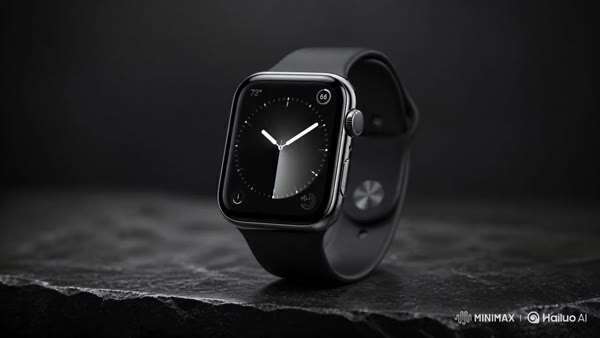
Smartwatch Product Demo
A sleek, premium smartwatch with a polished metal casing and illuminated display sits centered on a matte black stone surface. The watch remains still as soft ambient reflections…

UGC Cheeseburger ASMR Food Advertisement
0–3s (VIRAL HOOK): Extreme macro close-up of a gourmet cheeseburger being lifted slowly. Melted cheese stretches dramatically between bun and patty—thick, glossy, elastic strands.…
- Ecommerce teams planning TikTok product ads
- Marketers testing one hook or product angle at a time
- Creators who need a reviewable vertical ad project
- A written product description and optional product image
- A TikTok audience, opening hook, and supported product fact
- One offer and one call to action to include in the brief
- A nine-shot ad script and storyboard
- Voiceover, synced captions, and a default 9:16 editor project
- A reviewed export you can upload to TikTok separately
How this tool works
Write the TikTok ad brief
Sign in and describe the product, intended viewer, hook, supported proof, offer, and CTA. Add a product image when appearance matters.
Generate one ad project
Choose the presenter and voice options available in the UGC Ad workspace, then start one credit-based generation.
Review, export, and upload
Check all nine scenes, product details, claims, voiceover, captions, safe-zone placement, and CTA. Export manually, then upload through your own TikTok workflow.
Give every part of the TikTok ad a clear job.
Enter these details in the required product description. They are brief-writing prompts, not separate fields in the current workspace.
- Hook: name one audience problem, question, or product moment for the opening.
- Demo: describe the product action or detail the viewer should see.
- Proof: use an observable feature or a claim you can substantiate.
- Offer: state only the price, discount, or availability that is actually current.
- CTA: choose one next step that matches the destination page.
Map a product idea from hook to CTA.
Example brief: a foldable desk phone stand for people taking video calls at a small desk. This is a writing example, not a customer testimonial or campaign result.
- Hook: Still balancing your phone against a mug for video calls?
- Demo: show the stand unfolding and holding the phone on the desk.
- Proof: show the actual hinge and viewing position; verify the product works as shown.
- Offer: include a discount only when the landing page currently shows it.
- CTA: See the dimensions and available colors on the product page.
Review the vertical project against the current placement.
The Reelsy workflow defaults to 9:16. TikTok's June 2026 in-feed specification also recommends 9:16 for Non-Spark ads, but requirements and safe zones vary by format, caption length, and added elements.
- Confirm the current TikTok Ads Manager specification before upload.
- Keep the product, proof, captions, and CTA away from interface overlays.
- Check that the voiceover is audible and the captions match it.
- Inspect all nine generated scenes for product and claim accuracy.
- Export from the editor, then upload and configure the ad separately.
One reviewed TikTok ad project per generation.
The public controls below are a fixed planning prototype. They do not generate a custom ad or carry a completed TikTok brief into the workspace.
- Product description is required; a product image is optional.
- The generator creates one task per submission, not a batch of variants.
- The output includes a nine-shot script, voiceover, captions, and editor draft.
- Publication and TikTok Ads Manager configuration are manual.
- Approval, reach, views, clicks, and conversions are not guaranteed.
Write the first beat for TikTok
Put the audience and opening hook in the product description. The current workspace has no separate TikTok campaign field, so the brief must carry that direction.
Show proof you can support
Use an observable product feature, accurate demonstration, or offer detail. Generated visuals and claims still need human review before use.
Export before you upload
Reelsy prepares an editor project. TikTok Ads Manager setup, current specification checks, approval, publication, and campaign measurement remain separate steps.
The live workspace is private by design.
This page explains the tool clearly before signup. The actual generation surface stays inside your account so sessions, assets, credits, and exports remain private.
Questions before you start
What is a TikTok ad generator?
A TikTok ad generator helps turn a product brief into ad creative for TikTok review. Reelsy's current entry point uses the UGC Ad workflow to generate a nine-shot script and storyboard, voiceover, synced captions, and an editor project. It does not create or configure a TikTok Ads Manager campaign.
What input does the TikTok ad workflow need?
The web form requires a product description and accepts an optional product image. Put the intended TikTok audience, hook, supported product fact, offer, and CTA in the description because the current form does not expose separate campaign fields for them.
Does the generator create a 9:16 TikTok video?
The UGC Ad agent defaults to a 9:16 editor project. Review the framing and safe-zone placement, then confirm the current specification for your exact TikTok placement before export and upload.
What does Reelsy generate for the ad?
The workflow prepares nine scripted scenes, product-led images, a voiceover, synced captions, and an editor draft. Review every scene, product detail, statement, and CTA before exporting the video.
Can I generate several TikTok ad variations at once?
No. The current workflow starts one generation task per submission. Change the brief and run a separate task for another hook, offer, or product angle, then compare the reviewed exports with your own campaign data.
Is the TikTok ad generator free?
The public planning preview is free to explore and does not run AI generation. Creating the actual ad project after login uses credits. Check current pricing and your available credits before you start.
Does Reelsy publish the ad to TikTok?
No. Reelsy prepares a project for review and manual export. You upload the file, configure the campaign, confirm current TikTok requirements, and submit it for platform review yourself. Generation does not guarantee approval or campaign performance.
Plan your next creative step
Browse product video examples
Review public product-ad shots and pacing ideas without treating them as guaranteed workflow outputs.
Plan the first three seconds
Use the hook guide to make the opening specific before you write the product brief.
Review AI video best practices
Check product accuracy, claims, captions, pacing, and delivery before using a generated ad.
Check current pricing
Review plans and credits before starting a private generation.
Review current TikTok in-feed specifications
Confirm dimensions, file requirements, and placement-specific safe zones on TikTok for Business before upload.
Turn a TikTok product brief into a reviewable ad project.
Bring a product description and optional image. Generate one project, review every scene, and export before uploading it yourself.
Choose the page that matches the job
UGC Ad Generator
Turn product benefits, offers, and objections into creator-style UGC ads for paid social testing.
View toolAI Product Video Generator
Turn a Shopify or WooCommerce product URL and selected images into a reviewable product video draft.
View toolViral Clone
Analyze a TikTok or YouTube reference, then turn the pacing into a reusable short-video plan.
View tool